You are pairing with an AI coding agent — Claude Code, Cursor, whatever — in your repo, and for "open the pull request, call the staging API, run the deploy" it needs credentials. Hand it some and the obvious handoff is already the leak — and "then I just won't give it any" does not save you: it then fetches them itself, reads the .env, queries the vault — and leaks them in the process, without you ever noticing. In both cases the value passes through the AI model, and it is gone.
Here is the uncomfortable part: in most agent setups the credential leaves your infrastructure and lands with the model provider or a service it runs — stored, out of your control. (Self-hosted or enterprise models change how it's stored and trained on — the value is still out of your hands.) For most companies that is also a compliance problem. Here is why it happens, and how to close it for good.
TL;DR — AI agents leak credentials by reading them as output that gets shipped to the model provider. The fix is to let an agent use a secret without ever seeing it.
Why the obvious setup leaks
The mechanism is simple — and sneaky: the moment the agent reads the value — from .env, a vault, or your message — it becomes part of the conversation the agent sends to the AI provider. The token is now in someone else's logs. Deleting the chat afterwards does nothing; it was transmitted the moment it appeared.
You cannot fix this by telling the AI to "please be careful." An instruction in a prompt is advice, and advice gets ignored — by this agent, the next one, or some tool wrapped around it. The fix has to be structural: the secret must be impossible to see, not merely discouraged.
This is not hypothetical. In early 2026, security researchers found that 7% of the skills on ClawHub — the extension marketplace for the AI agent platform OpenClaw — leaked credentials in exactly this way; I broke that incident down in the OpenClaw leak. This is no OpenClaw special case: the same mechanism hits every skill, every MCP tool, and every command Claude Code or Cursor runs — the moment an extension reads a secret, it is in the model's context.
And it is not only agents fetching secrets: millions of developers — and "vibe coders" — paste API keys straight into the prompt every day. The same leak, done by hand — out of convenience and a naive trust that it'll be fine.
Using is not seeing
Here is the whole solution in one line: an agent has to use a credential, but it never has to see it. Those are two different things, and keeping them apart is the entire trick.
Concretely, the secret goes into the program the agent runs — never into the text the AI model reads. The shell sits in between: it hands the value to a program as an environment variable, while the agent only ever sees the command it typed.
One scope note up front: this is about accidental leaking in day-to-day use — the model never gets to see the value. A fully compromised agent with arbitrary shell execution is a different threat model; more on that below.
Where does the secret live?
Keeping a secret out of the AI's sight only works if it lives somewhere a tool can fetch it on demand — not hardcoded in the repo, not pasted into a config the agent reads. That somewhere is a secrets manager (a vault): one place that stores credentials encrypted, hands them to authorized programs, and records who touched what.
I use Infisical — open source and self-hostable (the secrets stay on my own infrastructure), with first-class machine identities: headless, short-lived-token auth built for exactly this agent-and-CI use. Its real payoff for this problem: Infisical does three things in one — fetch the secret, put it in the program's environment, and run the command — and the value never appears on stdout. That chain (fetch → env → run) is exactly what a vault like HashiCorp Vault, pass or AWS Secrets Manager does not do for you: those only hand back the value, so you wire the chain yourself as a short wrapper script. Both reach the same result; Infisical is just the path of least resistance.
In practice: it's mostly one command
Once the secret lives in Infisical, here is what that looks like in practice: the agent should list your open pull requests — to do that it runs GitHub's CLI gh pr list, and gh needs your GitHub token. Instead of handing it the token, you let Infisical run the command:
infisical run --env=prod --path=/git -- gh pr list
Step by step: infisical run fetches the secrets from the /git folder (environment prod) and starts a new process for the command after the -- (here gh pr list) — with the secrets in its environment. Each secret becomes an environment variable with the same name as its key in Infisical: the /git folder holds a secret called GITHUB_TOKEN, so the process sees $GITHUB_TOKEN. The GitHub CLI gh reads that variable on its own — the way many tools pick up their token from a known env var — and does its job. The key point: the secret lives inside that child process, not with the agent, and its value never shows up on stdout — so never in the transcript the agent sends to the AI. That is the fetch → into the env → run chain from above, packed into one command. For most teams, that is the solution.
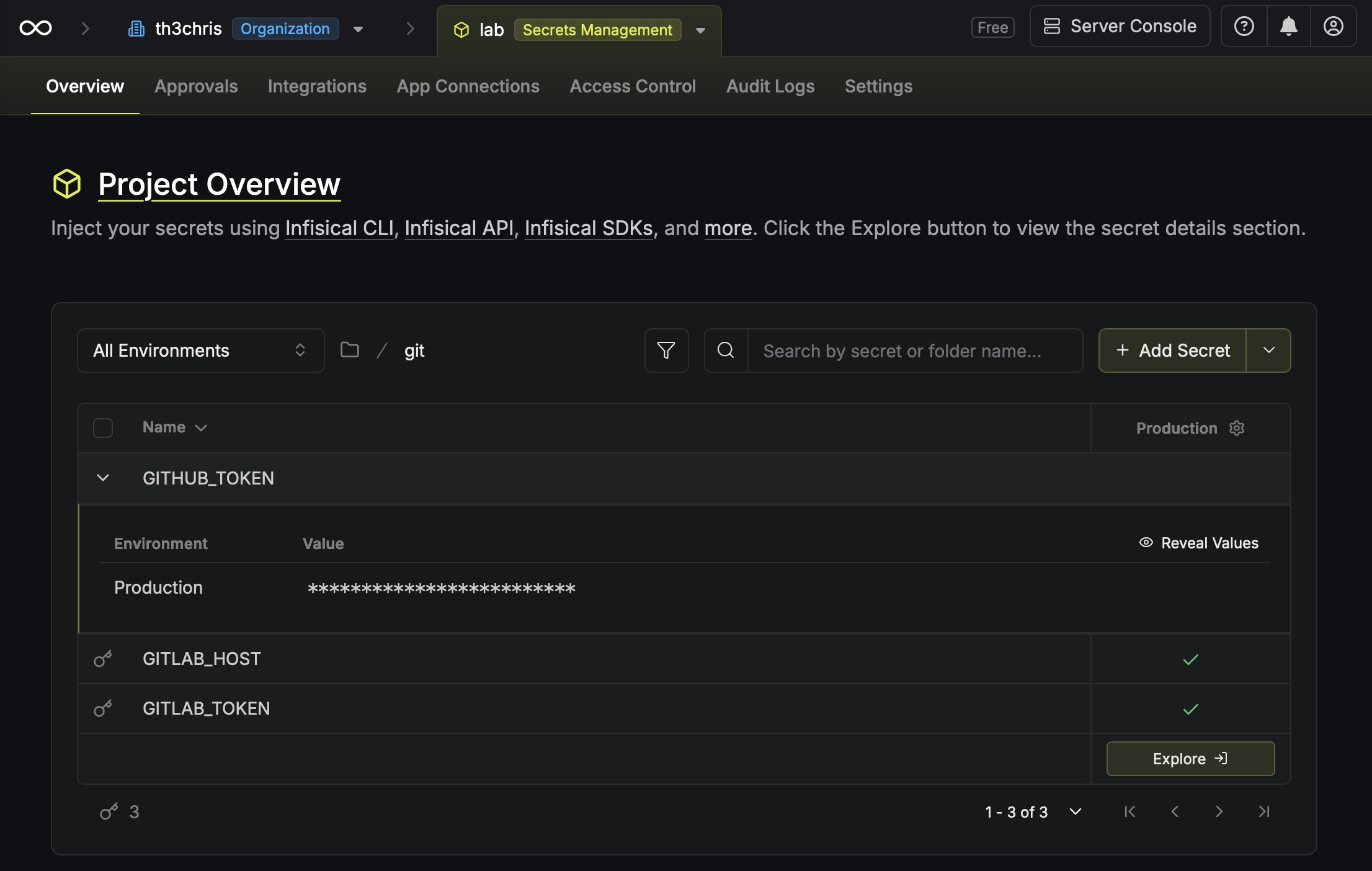
/git folder holds a secret named GITHUB_TOKEN — that exact key becomes $GITHUB_TOKEN in the process (the values stay masked).I wrap it in a get-secret helper so the call is short and the auth is automatic:
get-secret exec git -- gh pr list
Under the hood that is just infisical run with a machine-identity token pulled from the OS keychain — so every call skips passing --token, --projectId and --domain by hand. For using a secret you could equally type the bare infisical run; here the wrapper is pure convenience.
That closes the leak: the secret is used, never seen — not by the model, not in the transcript. I checked it adversarially: fetch the real value, capture everything the command prints, search that output for the secret — over get-secret exec it shows up nowhere an agent could read it.
Reading single values (with a guardrail)
That covers using. But sometimes you only want to look at a value (debugging, a quick check) — or you ask the agent for it directly, e.g. "show me the staging DB password." For that there's a read path, and the catch: infisical secrets get GITHUB_TOKEN prints the value in plaintext to stdout. Fine for a human at a terminal; for an agent, that stdout is the transcript again.
So we put a small guardrail in front of it: print the value only when a human is actually watching.
# get-secret <folder>/<NAME> — print a value, but only to a human
val=$(infisical secrets get "$name" --env=prod --path="/$folder" --plain --silent)

# real terminal -> a human; a pipe -> an agent
if [ -t 1 ]; then
  printf '%s\n' "$val"
else
  printf '[redacted len=%s]\n' "${#val}"
  echo "reveal in a terminal: get-secret $folder/$name --show" >&2
fi
[ -t 1 ] checks whether stdout is a real terminal. An agent's stdout is normally a pipe — so it gets [redacted len=40] instead of the value, plus a hint for how a human reveals it in full at the terminal (--show).
So there is no misunderstanding: this is a guardrail, not a wall — and not the actual prevention. That lives in exec; an agent doesn't need the raw read path to use a secret at all. The guardrail only catches the most common reflex — "fetch the value and print it" — and it sits on this wrapper alone. Anyone with shell access and the token can call the raw CLI directly and get the value (or allocate a pseudo-terminal, which makes [ -t 1 ] true). A real wall only comes from not giving the agent the token in the first place — e.g. a sandbox that knows only the gated wrapper, not the raw CLI.
How does the agent know to use exec?
It doesn't, on its own — you tell it once. In the agent's instructions — CLAUDE.md, AGENTS.md, a skill, or the system prompt — you write: "use get-secret exec for secrets, never fetch the raw value."
Wait: isn't that just another prompt rule, the kind I said above don't work as a boundary? It is — but this one has a safety net. Follow it, and everything runs leak-free through exec. Reach for the read path instead, and you get [redacted]. The rule only picks the convenient path; that the obvious mistake gives nothing away is the structure's job (env injection + the gate). That's the difference between asking for behaviour and backstopping it.
If your vault has no run command
infisical run does the injection step for you: fetch the secrets, put them in the environment, run the command, never touch stdout. Vaults like HashiCorp Vault, pass or AWS Secrets Manager only hand you the value — so you write that one step yourself. It is a handful of lines:
#!/bin/bash
# run-with-secret <cmd...> — load a secret from any vault into the env, then run the command.
export GITHUB_TOKEN="$(vault kv get -field=token secret/git)"   # or: pass show git/token, aws secretsmanager get-secret-value …
exec "$@"
run-with-secret gh pr list passes the token to gh through the environment via command substitution — it never crosses stdout, so the agent sees only the command, never the value. More secrets? More export lines. That is exactly what get-secret exec does under the hood; Infisical just saves you from writing it.
So the split is simple. The read gate above you build once, whatever vault you use. The injection is free with Infisical (infisical run) and a few lines with anything else. The safety never lived in the vault — it lives in how you hand the value to the agent: into the process, never into the prompt.
Writing a new secret
Writing a new secret is the asymmetric direction: the value has to enter from somewhere, and if a person pastes it into chat for the agent to store, that paste is already the leak. So the write path takes values only over stdin or a file, never typed into a command:
echo -n "$VALUE" | set-secret git/TOKEN - # wraps `infisical secrets set`, reads stdin
Get the scripts
The whole thing is, in the end, a short shell script: infisical run to use secrets, a TTY-gated infisical secrets get to read one, and for auth a headless machine identity pulled from the OS keychain (no interactive login). Here are the two wrappers to download: get-secret and set-secret.
Install (macOS; needs the infisical CLI and jq):
mkdir -p ~/.local/bin
curl -fsSL https://th3chris.com/scripts/get-secret -o ~/.local/bin/get-secret
curl -fsSL https://th3chris.com/scripts/set-secret -o ~/.local/bin/set-secret
chmod +x ~/.local/bin/get-secret ~/.local/bin/set-secret
The scripts assume macOS — credentials live in the Keychain. The pattern itself is platform-independent: on Linux/Windows just swap the security call (step 3) for your OS secret store (libsecret/pass, Windows Credential Manager), or pass the machine identity via an INFISICAL_TOKEN env var.
Setup (one-time):
-
Install the
infisicalCLI andjq. -
Create a machine identity in Infisical (Org → Access Control → Identities → Universal Auth), generate a client secret, and give the identity read access to the project (write access too, for
set-secret). -
Put the client ID and secret in the keychain (service name = your
KEYCHAIN_SVC) so it never lands in shell history:security add-generic-password -s infisical-machine-identity -a "$USER" -U -w # at the prompt, enter: CLIENT_ID:CLIENT_SECRET -
Fill in the
CONFIGblock at the top of the script — justINFISICAL_DOMAIN(your instance, orhttps://app.infisical.com) andKEYCHAIN_SVC(the name from step 3). Project and environment do not go here — they live per repo (step 5). -
Bind each repo to a project — a
.infisical.jsonwithworkspaceId(the project ID from the project URL / Project Settings) anddefaultEnvironment(env slug, e.g.prod):printf '{"workspaceId":"<projectId>","defaultEnvironment":"prod"}' > .infisical.json(
infisical initdoes this interactively, but needs a login session; with a machine-identity-only setup you write the non-sensitive file by hand.)
After that, get-secret exec <folder> -- <cmd> just works in the repo.
Multiple projects? You don't copy the script per project — it lives once, globally, in your PATH (~/.local/bin). Which Infisical project applies is recorded in each repo's .infisical.json: the wrapper reads the workspaceId from it and passes it as --projectId. That step is necessary because Infisical's machine-identity auth always requires an explicit project ID — the CLI's .infisical.json auto-detection only kicks in for an interactive login. So get-secret exec git -- … hits the right project in each repo — no flag, no second copy; if the file is missing, the wrapper stops with a hint.
This is a workstation setup. In CI there is no keychain — there you pass the token via INFISICAL_TOKEN from a masked CI variable, or use OIDC auth. And: Universal Auth with a static client secret is the simplest, not the safest option — rotate it like any credential, or use OIDC/native identities where the runtime supports them.
Most companies solve this today with prompt rules — "please don't print secrets." The problem: a prompt rule is not a security boundary. If you want to run AI agents in production, you need technical boundaries instead of behavioral ones — exactly the kind this article describes. Drawing those boundaries cleanly, so automation moves fast without quietly creating risk, is part of what I do.